Doll House Decoration Game

Doll House Decoration Game

Creative Decoration
Developer: Dream Pixel Core
Published: 2024-09-16
Updated: 2026-06-12

Reviews

Doll House Decoration - Home Design Game is a delightful choice for children who enjoy creative play. The interface is simple, allowing kids to drag and drop items without frustration. The variety of furniture and color options keeps each room fresh and engaging. Unlocking new items adds a sense of progress and motivates continued play. It is a safe, ad-free environment that encourages imagination and design skills. Perfect for quiet time or as a fun activity for young learners.

Description

Game Introduction

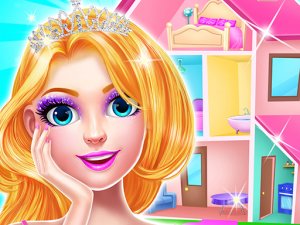
Doll House Decoration - Home Design Game invites children to become interior designers for a charming dollhouse. Players can decorate each room, from bedrooms to living areas, using a wide selection of furniture, wall colors, and decorative items. The game provides a safe, creative outlet where kids can experiment with layouts and color combinations. It is designed to be intuitive and enjoyable for young players, fostering imagination and a sense of accomplishment as they build beautiful homes for their doll friends.

How to Play

To play, start by picking a room in the dollhouse. A menu shows furniture and decorations available. Drag and drop items into the room to place them. You can move, rotate, or remove any item to adjust the design. Use the color palette to change wall and floor colors, as well as furniture shades. Completing a room unlocks new items and accessories, giving you more options for future designs. The controls are simple and easy to use, making the game accessible for children of all ages.

Game Features

Game features include: creative freedom to design each room exactly as you imagine. A wide variety of furniture, colors, and accessories to choose from. Cute baby dolls that live in the dollhouse. Unlockable items that reward progress. Simple drag-and-drop controls suitable for young children. A relaxing, no-pressure environment that encourages experimentation.

Tips for Success

Start with one room at a time to focus your ideas. Experiment with different color combinations to see what looks best. Try placing furniture in various positions to find the most pleasing layout. Use the rotate feature to see how items fit from different angles. Don't be afraid to remove and replace items until you are happy with the design. Completing rooms unlocks more items, so keep decorating to expand your options.

Compatibility

๐Ÿ’ป Desktop | ๐Ÿ“ฑ Mobile | ๐Ÿ“Ÿ Tablet
โ€“ All supported ยท Best with Chrome or Safari
Faq
Is this game suitable for very young children?
Yes, the game is designed with simple drag-and-drop controls and a gentle, no-pressure environment, making it accessible and enjoyable for children of all ages, including preschoolers.
Can I play this game on a tablet or smartphone?
While the game description focuses on desktop play, many decorating games of this type are optimized for touchscreens. Check the app store or game website for specific device compatibility.
Are there any in-app purchases or ads?
The provided information does not specify in-app purchases or ads. Many free kids' games include optional purchases or ads, so it is best to review the game's privacy policy or parental controls before allowing children to play.
How many rooms can I decorate in the dollhouse?
The game description mentions decorating rooms such as bedrooms and living areas, but does not specify an exact number. Typically, dollhouse decoration games offer several rooms to design, with more becoming available as you progress.
Can I save my designs and come back later?
The game description does not explicitly mention saving features. Many similar games allow you to save your progress automatically, but it is advisable to check the game's settings or help section for confirmation.
Is the game available in multiple languages?
The game description does not list language options. Many children's games are available in English and sometimes other major languages. You may need to check the game's store page or settings to see available languages.
Advertisement