
Reviews
Flight Path: Airspace Coordinator succeeds in making a potentially stressful job into a relaxing yet stimulating puzzle experience. The gradual difficulty increase ensures you never feel overwhelmed early on, while the endless mode provides lasting replay value. The clear visual design and responsive controls make coordination feel smooth. It is an excellent choice for anyone who enjoys strategy games that require planning and quick thinking without time pressure.
About this game
Core Concept & Controls
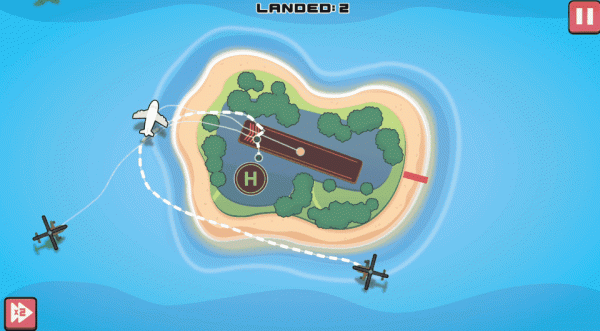
Flight Path: Airspace Coordinator places you in a control tower environment where your primary responsibility is managing incoming aircraft. Each plane appears on the radar with a designated approach path. You select an aircraft and assign it a landing sequence by choosing from available runways or holding patterns. The interface provides clear visual indicators for altitude and speed, allowing you to time your commands precisely. As aircraft enter your airspace from multiple directions, you must sequence their landings to prevent any two from getting too close. The game uses a point-and-click system that feels intuitive, making it accessible for newcomers while offering depth for those who enjoy careful planning.
Strategic Depth & Difficulty Curve
The challenge escalates gradually as more aircraft appear on the radar. Early sessions might involve managing three or four planes, but as you demonstrate competence, the system introduces additional traffic. This creates a natural learning curve where you develop skills in prioritization and route planning. Each aircraft has unique speed and descent characteristics, requiring you to adjust your strategy on the fly. The game rewards foresight: successful controllers anticipate bottlenecks and adjust holding patterns before congestion occurs. This strategic layer transforms what might seem like a simple coordination task into a satisfying puzzle that tests your ability to think several steps ahead.
Visual Design & Feedback Systems
The visual presentation uses bright, clear graphics that make aircraft easy to distinguish. Each plane type has a distinct silhouette and color scheme, helping you identify them at a glance. The radar display shows real-time positions with trail lines that indicate recent movement, giving you a sense of each aircraft's trajectory. Audio cues complement the visual information: a soft chime signals a new arrival, while a gentle alert warns when two planes are on converging paths. This multi-sensory feedback helps you maintain awareness even during busy periods. The interface remains uncluttered, with essential information displayed without overwhelming the screen.
Endless Mode & Replay Value
The endless mode means there is no predetermined endpoint. Your session continues as long as you successfully manage the traffic flow. This design encourages repeated play because each session generates a unique sequence of arrivals. You might face a steady stream of similar aircraft one time and a chaotic mix of different types the next. The scoring system tracks your performance, giving you a reason to improve your efficiency and aim for longer sessions without incidents. This format suits both short play sessions and extended gaming periods, adapting to your available time while maintaining consistent engagement.
Family-Friendly Design Philosophy
The developers have crafted an experience suitable for all age groups. There is no violent content or stressful time limits that might frustrate younger players. Instead, the challenge comes from logical thinking and spatial awareness. The game provides gentle guidance through visual prompts, so new players can learn the mechanics without reading lengthy instructions. Parents can feel confident allowing children to play, as the content focuses on problem-solving and coordination skills. The bright color palette and friendly aircraft designs contribute to an atmosphere that feels welcoming rather than intense.








Comments
Sign in to leave a review
No account? Create one
No comments yet.